After a Review - Locking the Review

Description
This workflow allows Assessors to lock a review to prevent further editing, and to allow signatures to be captured.
Required module
ePortfolio
Type of user
- Assessors
Features
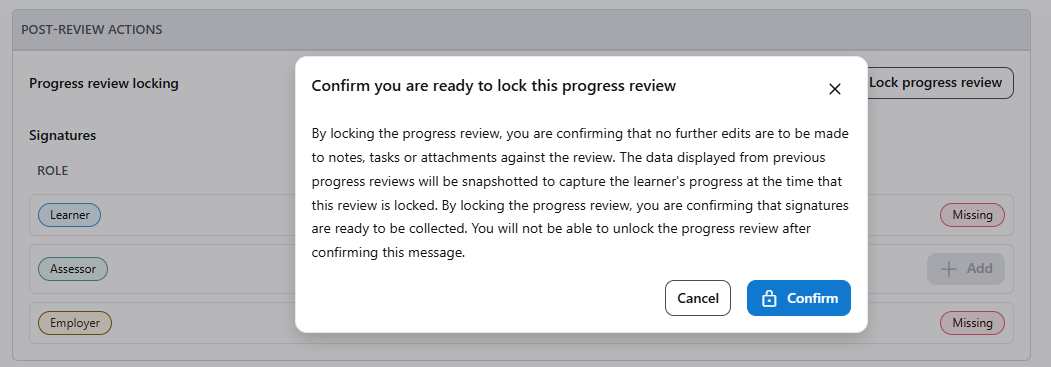
- When the Assessor is satisfied with the contents of a review record, then the review record can be locked via the 'Lock progress review' button. When the button is selected, an alert will appear informing the Assessor of three impacts this will have on the review record:
1) Prevent Editing - When the Assessor wishes to ensure no further edits can be made to the review record, then locking the review prevents further changes from occurring.
2) Collection of Signatures - Signatures can only be captured on a review record once it's content has been locked from further edits. This ensures that every signatory is signing off the same content.
3) No Unlocking - Once a review record has been locked, it cannot be unlocked. Therefore, the Assessor has the opportunity to cancel the locking when viewing the alert.
- When the review record is locked, then the 'Lock progress review' button is replaced with an information banner displaying who locked the review and when.
- When the review record is locked, then the 'Off-The-Job Hours' and 'Evidence' sections will display the progress data at the time the review is locked.
- When the review record is locked, then the 'Tasks from previous reviews' section will display each Task's completion status at the time the review is locked.
- When the review record is locked, the Notes within the review record become read-only.
- When the review record is locked, the 'Add task' button is hidden from the review record and tasks cannot be edited.
- When the review record is locked, the 'Add attachments' button is hidden from the review record and attachments cannot be deleted. However, they can still be downloaded.
- When the review record is locked, the 'Overall Review Summary' within the review record becomes read-only.