After a Review - Admin Progress Review Report

Description
This workflow allows Admins to export a report containing all review data from Apprenticeship Management
Required module
ePortfolio
Type of user
- Administrator
Features
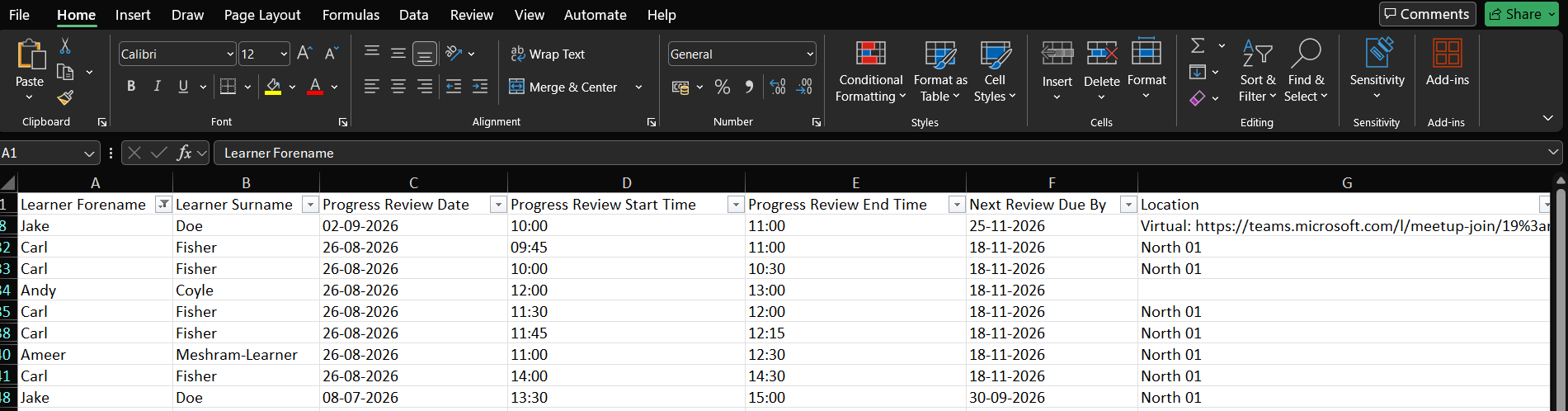
- Administrator users have access to a CSV export of all review records booked within Apprenticeship Management. The report does not include review data for any reviews booked outside of Apprenticeship Management, including 'Formal Reviews' booked in Smart Assessor. With consideration that the report includes all Apprenticeship Management review data, it is not advisable to share with other roles, including Assessors, without first filtering the report to only show applicable data using an app, such as Excel.
- The report can be accessed via 'Reports' > 'Progress Review Overview' in the menu items. Selecting 'Progress Review Overview' will initiate a download of the report in CSV format.
- The report contains a row per booked review record, including upcoming reviews and past occurrences.
- The reports columns include:
1) MIS Learner ID - this displays the MIS Learner ID value stored against the learner from ePortfolio (Smart Assessor).
2) ULN - this displays the ULN value stored against the learner from ePortfolio (Smart Assessor).
3) Learner Forename - this displays the forenames of the learner associated with the review record.
4) Learner Surname - this displays the surname of the learner associated with the review record.
5) Progress Review Date - this displays the date the review was booked for, in the format dd/mm/yyyy.
6) Progress Review Start Time - this displays the start time of the review in a 24-hour format of hh:mm.
7) Progress Review End Time - this displays the end time of the review in a 24-hour format of hh:mm.
8) Next Review Due By - by leveraging the 'Default Review Frequency' Master Admin setting in Smart Assessor, this displays the date that the next review is due by in the format dd/mm/yyyy.
9) Location - this displays the location details of the review, including if the review was held as a Microsoft Teams meeting.
10) Invitees - this displays a comma separated list of the names of the invitees to the review.
11) Note 1 - this displays the note value for the 'Portfolio progress' note.
12) Note 2 - this displays the note value for the 'Progress in the workplace' note.
13) Note 3 - this displays the note value for the 'Progress in other courses' note.
14) Note 4 - this displays the note value for the 'Wellbeing' note.
15) Note 5 - this displays the note value for the 'Other discussion points' note.
16) Overall Review Summary - this displays the Overall Review Summary for the review record.
17) Assessor Signature Completed - this displays a Yes/No value to determine an Assessor signature has been added to the review.
18) Assessor Signature Name - this displays the name of the Assessor who has signed the review. In the event more than one Assessor has signed the review, then the report displays the details for the first added signature.
19) Assessor Signature Datetime - this displays the date and time in the format dd/mm/yyyy hh:mm that the Assessor signature was added.
20) Learner Signature Completed - this displays a Yes/No value to determine the Learner signature has been added to the review.
21) Learner Signature Name - this displays the name of the Learner who has signed the review.
22) Learner Signature Datetime - this displays the date and time in the format dd/mm/yyyy hh:mm that the Learner signature was added.
23) Employer Signature Completed - this displays a Yes/No value to determine an Employer signature has been added to the review.
24) Employer Signature Name - this displays the name of the Employer who has signed the review. In the event more than one Employer has signed the review, then the report displays the details for the first added signature.
25) Employer Signature Datetime - this displays the date and time in the format dd/mm/yyyy hh:mm that the Employer signature was added.
Note the in the instance multiple Assessors or Employers have been invites to a Progress Review, then the report will add additional columns to surface the additional signatures.