During a Review - Capturing Follow-Up Tasks

Description
This workflow allows Assessors to capture Tasks discussed within a review that the Learner must complete.
Required module
ePortfolio
Type of user
- Assessors
Features
- During the review discussion, Assessors may identify actions that the learner needs to complete following the review. These actions can be captured as Tasks within the review record.
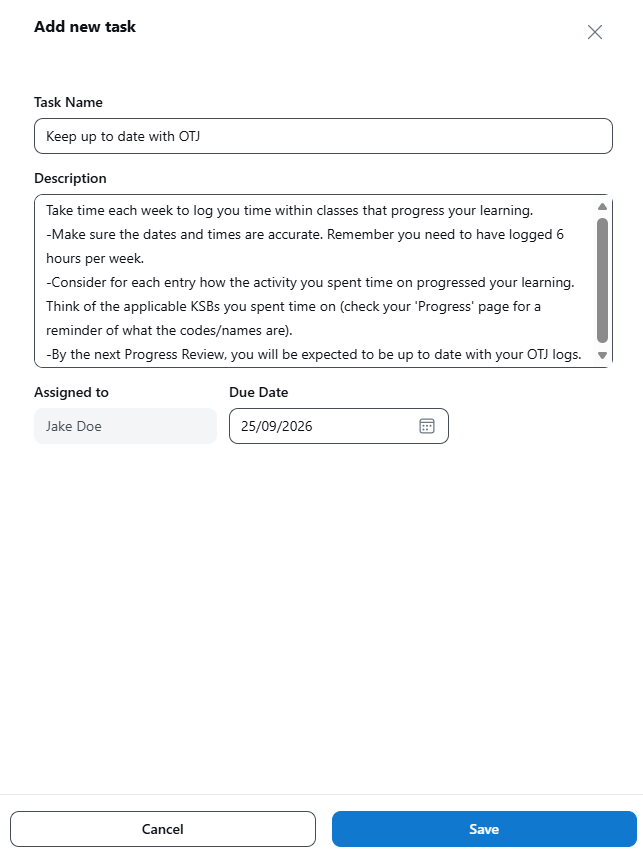
- Within the 'Tasks from this Progress Review' section, the Assessor will have access to an 'Add task' button. This button will open a side-drawer to capture the new Task record:
1) Task Name - this is a required field - The Task can be provided with a short name to ensure it is easily identifiable at a glance to the Learner, as well as other Assessors and Employers who may wish to keep track of the Task's progress.
2) Description - this is a required field - The description can be used by the Assessor to provide clear instructions to the Learner so they understand what needs to be completed.
3) Assign To - this is a read-only field - The current functionality only allows the Learner to be assigned as the owner of the Task. Therefore, their name will automatically populate in the field and cannot be edited.
4) Due Date - this is an optional field - In the event the Assessor wants to set a deadline for the Learner to complete the Task, then a due date can be added in.
- Once the information has been added in, the Assessor can save the Task.
- Saved Tasks captured in the review will display in a list view within the Review Record. The Assessor has access to then edit or delete a Task if necessary. Learners have access to update the Task as 'Completed' and leave a comment. Employers have read-only access to Tasks captured in reviews.
- Tasks captured within the Review Record will surface within the Learner's To Do list on their homepage and within their 'To Do' page. Assessors and Employers can monitor the Tasks within the 'Tasks' section of the Learner Profile.