What's New
Apprenticeship Management
Accessibility
Accessibility Statement for Assessment & Learning (bksb) - UK
Accessibility Statement for Assessment & Learning (bksb) - Australia
Accessibility Statement for Apprenticeship Management Suite
Assessment & Learning
ePortfolio
Administrator Settings
To Do Lists
Delivery Staff - Signatures Missing
Delivery Staff - Evidence to Review
Delivery Staff - Off-The-Job to Review
Timelog
Logging Off-The-Job
Editing Off-The-Job
How is Off-The-Job Progress Calculated?
Reviewing Off-The-Job
Deleting Off-The-Job
Evidence
Reviewing Evidence
Deleting Evidence
Uploading Evidence
Uploading a New Version of Evidence
Editing Evidence
Progress Reviews
FAQs for Adopting the New Progress Review Workflow
Before a Review - Booking a New Review
Before a Review - Viewing Booked Reviews
Before a Review - Cancelling a Booked Review
Before a Review - Checking Progress Since the Last Review
During a Review - Capturing Review Notes
During a Review - Capturing Follow-Up Tasks
During a Review - Attachments
After a Review - Capturing the Overall Review Summary
After a Review - Locking the Review
After a Review - Capturing & Tracking Signatures
After a Review - Viewing & Booking the Next Review
After a Review - Admin Progress Review Report
Coming Soon... Progress Reviews
New customer information
Education Analytics
Education Analytics Guides
Data Platform Guides
Data Platform FAQs
Data Platform (Bring Your Own BI/Data Share) - User Licence Assignment Administration
Data Platform (Bring Your Own BI/Data Share) - Connection Options
Data Platform (Bring Your Own BI/Data Share) – How to Connect Microsoft Power BI to OneAdvanced Data Platform
Data Platform (Bring Your Own BI/Data Share) - Connecting Microsoft Excel to Snowflake Using ODBC
Data Platform (Bring Your Own BI/Data Share) - Snowflake ODBC Connector Configuration Guide
Onboarding
Onboarding videos - Learner
Onboarding videos - Assessors & Employers
Onboarding videos - Progress Reviews
ePortfolio Learner UX - Fact sheet
Customer Support
Integrations
- All Categories
- Apprenticeship Management
- ePortfolio
- Progress Reviews
- Before a Review - Cancelling a Booked Review
Before a Review - Cancelling a Booked Review

Description
This workflow allows Assessors to cancel a booked progress review.
Required module
ePortfolio
Education - Microsoft Teams (Optional - Administrators will have needed to configure the tenant)
Type of user
- Assessors
Features
- In the event a booked Progress Review is no longer planned to go ahead, the Assessor can cancel the review to keep a record of the cancellation for future audits, and inform invitees of the cancellation. Only Progress Reviews with the status 'Upcoming' can be cancelled.
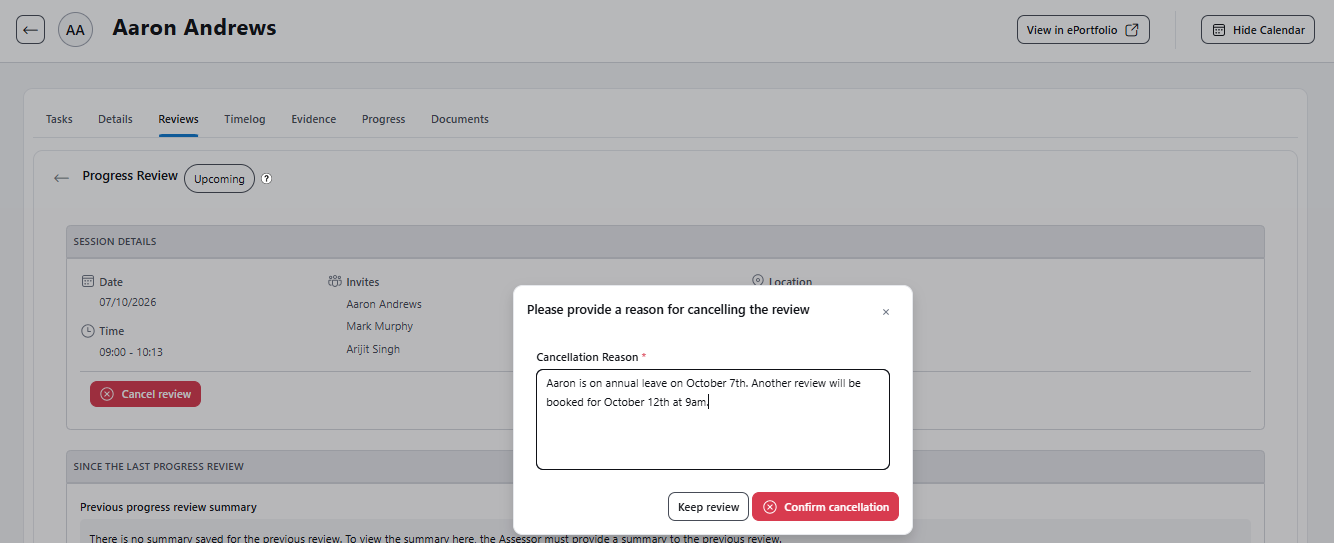
- To cancel a Progress Review, the Assessor will open the applicable Review Record. Within the 'Session Details' section, there will be the option to 'Cancel review'.
- The Assessor will need to provide a reason why the review is been cancelled before confirming the cancellation. There is the option to keep the review if required at this stage.
- Once the Assessor confirms the cancellation, three changes will be triggered:
1) The status of the Progress Review updates to 'Cancelled' and the cancellation reason is displayed as read-only text in the 'Session Details' section of the Review Record.
2) The calendar within Apprenticeship Management updates so the Progress Review event now has a 'Cancelled' chip. Each user with the event in their Apprenticeship Management calendar can choose to hide it from view if they so choose.
3) An email notification is sent to all invitees against the Progress Review. The notification will outline which Progress Review has been cancelled and also include the Assessor's cancellation reason in the message. Events in calendar apps, such as Outlook, can then be removed.