What's New
Apprenticeship Management
Accessibility
Accessibility Statement for Assessment & Learning (bksb) - UK
Accessibility Statement for Assessment & Learning (bksb) - Australia
Accessibility Statement for Apprenticeship Management Suite
Assessment & Learning
ePortfolio
Administrator Settings
To Do Lists
Delivery Staff - Signatures Missing
Delivery Staff - Evidence to Review
Delivery Staff - Off-The-Job to Review
Timelog
Logging Off-The-Job
Editing Off-The-Job
How is Off-The-Job Progress Calculated?
Reviewing Off-The-Job
Deleting Off-The-Job
Evidence
Reviewing Evidence
Deleting Evidence
Uploading Evidence
Uploading a New Version of Evidence
Editing Evidence
Progress Reviews
FAQs for Adopting the New Progress Review Workflow
Before a Review - Booking a New Review
Before a Review - Viewing Booked Reviews
Before a Review - Cancelling a Booked Review
Before a Review - Checking Progress Since the Last Review
During a Review - Capturing Review Notes
During a Review - Capturing Follow-Up Tasks
During a Review - Attachments
After a Review - Capturing the Overall Review Summary
After a Review - Locking the Review
After a Review - Capturing & Tracking Signatures
After a Review - Viewing & Booking the Next Review
After a Review - Admin Progress Review Report
Coming Soon... Progress Reviews
New customer information
Education Analytics
Education Analytics Guides
Data Platform Guides
Data Platform FAQs
Data Platform (Bring Your Own BI/Data Share) - User Licence Assignment Administration
Data Platform (Bring Your Own BI/Data Share) - Connection Options
Data Platform (Bring Your Own BI/Data Share) – How to Connect Microsoft Power BI to OneAdvanced Data Platform
Data Platform (Bring Your Own BI/Data Share) - Connecting Microsoft Excel to Snowflake Using ODBC
Data Platform (Bring Your Own BI/Data Share) - Snowflake ODBC Connector Configuration Guide
Onboarding
Onboarding videos - Learner
Onboarding videos - Assessors & Employers
Onboarding videos - Progress Reviews
ePortfolio Learner UX - Fact sheet
Customer Support
Integrations
- All Categories
- Apprenticeship Management
- ePortfolio
- Progress Reviews
- During a Review - Capturing Review Notes
During a Review - Capturing Review Notes

Description
This workflow allows Assessors to capture the discussion points of a review in notes.
Required module
ePortfolio
Type of user
- Assessors
Features
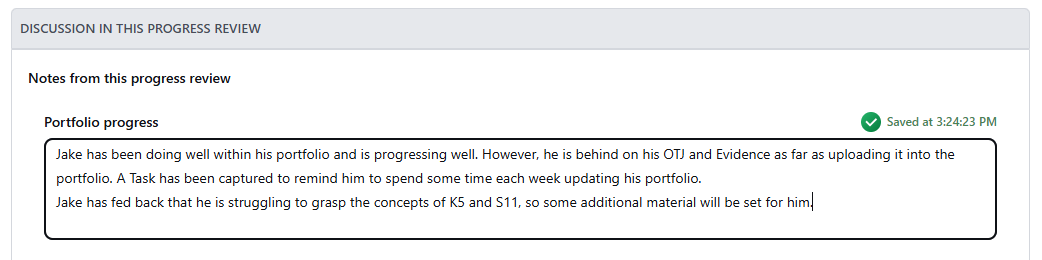
- When an Assessor is within a review record, there is a section called 'Discussion in this Progress Review' that can be leveraged to capture the discussion points during the review.
- There are 5 note fields that can be used within the review record:
1) Portfolio progress
2) Progress in the workplace
3) Progress in other courses
4) Wellbeing
5) Other discussion points - Each note field does not have a character limit.
- If the Assessor pauses for a few seconds after typing into one of the note fields, then the field will automatically save.