What's New
Apprenticeship Management
Accessibility
Accessibility Statement for Assessment & Learning (bksb) - UK
Accessibility Statement for Assessment & Learning (bksb) - Australia
Accessibility Statement for Apprenticeship Management Suite
Assessment & Learning
ePortfolio
Administrator Settings
To Do Lists
Delivery Staff - Signatures Missing
Delivery Staff - Evidence to Review
Delivery Staff - Off-The-Job to Review
Timelog
Logging Off-The-Job
Editing Off-The-Job
How is Off-The-Job Progress Calculated?
Reviewing Off-The-Job
Deleting Off-The-Job
Evidence
Reviewing Evidence
Deleting Evidence
Uploading Evidence
Uploading a New Version of Evidence
Editing Evidence
Progress Reviews
FAQs for Adopting the New Progress Review Workflow
Before a Review - Booking a New Review
Before a Review - Viewing Booked Reviews
Before a Review - Cancelling a Booked Review
Before a Review - Checking Progress Since the Last Review
During a Review - Capturing Review Notes
During a Review - Capturing Follow-Up Tasks
During a Review - Attachments
After a Review - Capturing the Overall Review Summary
After a Review - Locking the Review
After a Review - Capturing & Tracking Signatures
After a Review - Viewing & Booking the Next Review
After a Review - Admin Progress Review Report
Coming Soon... Progress Reviews
New customer information
Education Analytics
Education Analytics Guides
Data Platform Guides
Data Platform FAQs
Data Platform (Bring Your Own BI/Data Share) - User Licence Assignment Administration
Data Platform (Bring Your Own BI/Data Share) - Connection Options
Data Platform (Bring Your Own BI/Data Share) – How to Connect Microsoft Power BI to OneAdvanced Data Platform
Data Platform (Bring Your Own BI/Data Share) - Connecting Microsoft Excel to Snowflake Using ODBC
Data Platform (Bring Your Own BI/Data Share) - Snowflake ODBC Connector Configuration Guide
Onboarding
Onboarding videos - Learner
Onboarding videos - Assessors & Employers
Onboarding videos - Progress Reviews
ePortfolio Learner UX - Fact sheet
Customer Support
Integrations
- All Categories
- Apprenticeship Management
- ePortfolio
- Evidence
- Deleting Evidence
Deleting Evidence

Description
This workflow is for the deletion of Evidence Upload records, including files.
Required module
ePortfolio
Type of user
- Learners
- Assessors
Features
- Users can delete Evidence Upload records from the Evidence area. Alternatively, Evidence Upload records can be deleted from the Progress area.
- From the list of Evidence Upload records, users can select the ellipsis button for the row they wish to delete. From here, select 'Delete'.
- When the user has selected 'View', then the ellipsis button from the 'View' drawer can also be selected to show the 'Delete' option.
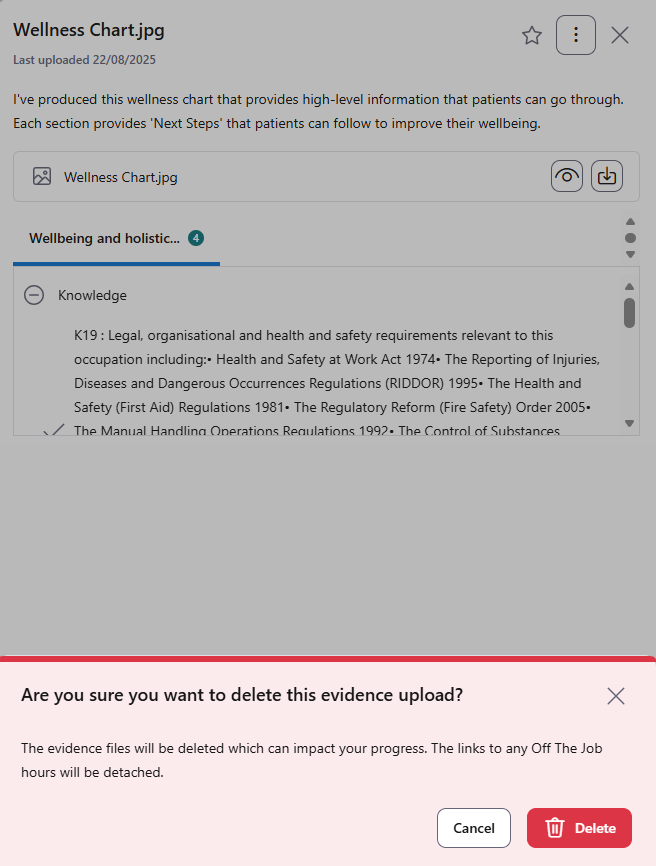
- The system will ask for confirmation when deleting an Evidence Upload record. The user has the opportunity to either cancel the deletion, or confirm it. Deleting Evidence Upload records impacts the Learner's progress, so it is advisable to check before deleting.
- The deletion will permanently remove the record, including the name, description, mappings and feedback as well as any files associated with the upload.
- In the event the Evidence Upload record is linked to an Off-The-Job (OTJ) record, then the link will also be deleted. The OTJ record itself will remain saved in the system.
- Learners have the permission to delete Evidence Upload records that have not yet been reviewed by their Assessor.
- Assessors have the permission to delete any Evidence Upload records linked to any Learner that they are associated with.